
Why your jewellery renders look flat
Flat jewellery renders are almost never a lighting problem. A real job: an eternity band whose CAD had to be rebuilt before it could be lit, and what changed.
Updated 23 September 2026
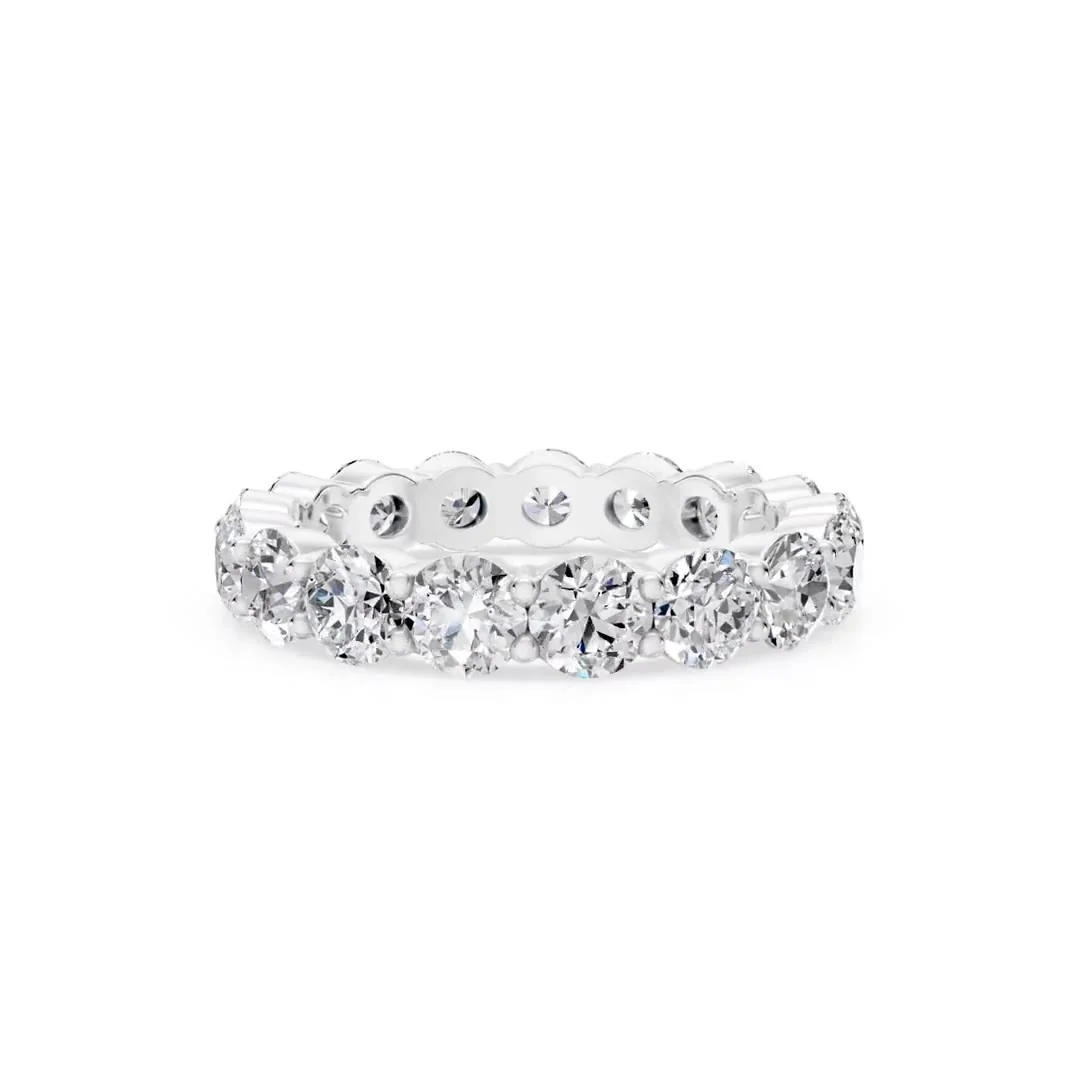
If your renders come back looking like a drawing of gold rather than gold, the instinct is to ask for better lighting. That is almost always the wrong place to look. Here is a job where the images were flat for a reason no lighting setup could have fixed.
The brief as it arrived
An ecommerce jewellery brand sent a reference image and their own CAD file for a round-brilliant eternity band, and asked for renders they could list with. They were a brand rather than a manufacturer, so the piece existed as a file, not as an object that could be photographed.
An eternity band is demanding to render for the same reason it sells well: it is almost entirely stone and reflection. There is very little plain metal for the eye to rest on, so anything wrong in the model shows up in every single image.
What was actually wrong
The metal in the supplied CAD was flat.
That word carries the whole problem, so it is worth being precise. Polished metal in a render does not really have a colour - it has a behaviour. It shows you the room around it. The bright edge running along a band, the dark line where a prong turns away from the light, the warm bounce between two stones sitting next to each other: all of that is metal reflecting its surroundings.
When a surface is flat, with no real curvature for light to travel across, there is nothing for those reflections to form on. Lighting can only give a surface something to reflect. It cannot give it somewhere to reflect it. That is why adding more lights to a flat model makes the images brighter without ever making them look like metal.
What was done
Nothing was rendered until the model was corrected:
- The CAD was rebuilt and re-set so the metal carried real, continuous form instead of flat faces.
- The geometry was smoothed, so light travels across the band and around each setting in an unbroken sweep rather than breaking at every facet of the mesh.
- Stones and metal were treated as separate objects, which is what lets a faceted stone refract and a metal surface reflect, each behaving as itself.
- Only then was the piece lit and rendered, in three metal colours.
The job went through three rounds of changes with the client before sign-off, and took about a week end to end - most of it the rebuild rather than the rendering.
What came out
This is the finished band, turning. A rotation is the honest test of the thing this page is about: watch the highlights travel along the shank and across each prong, and the darker band appear where the metal turns away from the light. That movement is the model reflecting its surroundings. The flat version could not do it from any angle.
Delivered as 1920 x 1920 px PNG and JPG stills and MP4 video through a download link on our own server, unbranded. The still set covered the same piece in three metal colours across multiple angles, graded so every image looks like it came from one sitting - which is what makes a set usable on a product page rather than a collection of separate pictures.
The client used the images on their website and in their catalogue.
The part worth taking away
The brief said render this CAD. The work was fix this CAD, then render it. A studio that renders only what it is handed would have delivered flat images and been technically correct about it.
So if your renders look wrong and more lighting is not helping, ask whoever is rendering them whether they checked the model first. If you are sending an existing CAD file, send it across and it gets checked before anything is lit.
Frequently asked questions
Why do my jewellery renders look flat even though the lighting is good?
Most often the metal surface in the model has no real curvature to reflect with. Polished metal in a render shows you its surroundings, so if there is nothing for light to travel across, no lighting setup will produce highlights. The fix is in the model, not the lights.
My CAD file already exists - can you just render it?
Usually yes, and that is the normal case. The model is checked first, because a file built for manufacturing is not always built for rendering. Where geometry needs correcting before it can be lit - flat metal, merged meshes, stones and metal not separated - that is handled as part of the job rather than sent back to you.
Can the same piece be rendered in more than one metal colour?
Yes. A piece that exists as a 3D model can be rendered in yellow, rose and white gold, and in silver and platinum, without photographing anything. The Website Combo covers 12 images of one design - 3 metal colours across 4 angles - plus 3 product videos and a 360-degree rotation video, at $20 per design.
What formats do the renders arrive in?
1920 x 1920 px PNG and JPG stills and MP4 video, through a download link on our own server. Files are unbranded, and an NDA is signed on request.
Ready to see your design as a photorealistic render?
Send a sketch, reference photo or existing CAD file and get a quote — every project is covered by NDA.
Get a Quote